


VidFox: AI Photo Video Maker
4.377.00 Reviews
App Specs
- Version
- 3.9.4
- Updated On
- License
- Free
- Downloads
- 1,000,000+
- Developer
- FANTASIATECH
- Categories
- Art & Design
- Platform
- Android
Screenshots
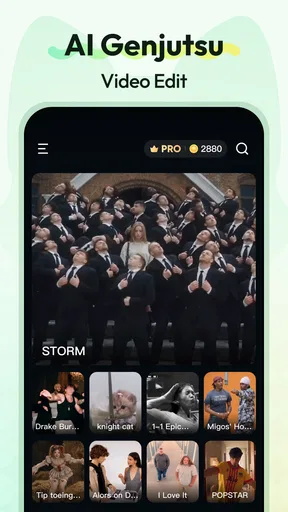
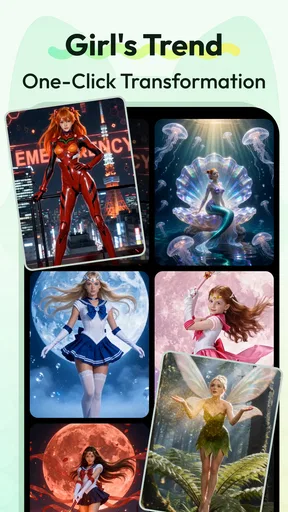

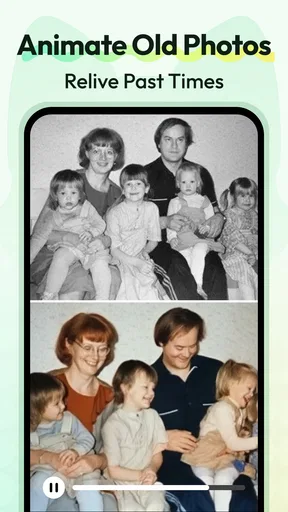

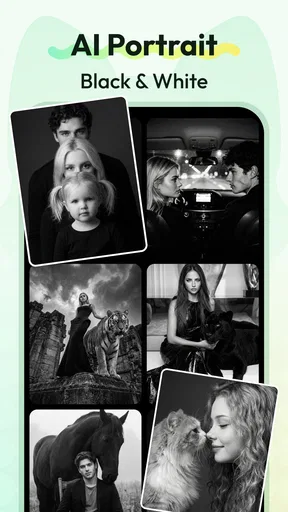


 Analysis by AppCompare
When I make a quick video on my phone, the part that can interrupt my flow is often not editing but waiting for an online service to respond. That matters with an AI-focused creation app: I’d plan a project around a reliable connection, especially when trying generation or browsing available creative material. VidFox: Al Video&Image Maker is aimed at people who want to turn images and clips into social-ready visuals without settling in for a desktop editing session. I see its appeal in quick, expressive projects, though it is less suited to anyone who needs a fully predictable, professional editing pipeline.
When the connection becomes part of the workflow
AI generation and online creative tools can make a phone-based workflow feel effortless when the network is behaving, but they also make connectivity relevant. I would start a prompt-driven task or explore the app’s available assets while connected, rather than assume every part of the process will be available in every situation. A weak signal can turn a quick creative break into a waiting exercise, so I’d avoid leaving the first attempt at an important post until the last minute.
That doesn’t mean every edit has to be planned around a connection. The practical distinction is between shaping material already on hand and relying on an online step to create or fetch something new. If I’m commuting, I’d choose a few photos and decide on the story first, then save any generation-heavy experiments for a steadier connection. That small change keeps the creative decision-making from being tangled up with loading delays.
Designed for phone-sized creative moments
As an Art & Design app from FANTASIATECH, VidFox is aimed at visual experimentation more than traditional, track-by-track editing. Its store summary describes an AI video generator and filters, and the app’s short name is VidFox. That positioning makes sense for someone who wants a stylized result quickly: a small business owner preparing a post, a student making a visual for a group project, or a friend turning a handful of photos into a birthday greeting.
Picture a realistic afternoon task: I’ve taken a few pictures at a café and want to share a short recap before the day is over. I can pick a visual direction, try a filter or AI treatment, and judge whether the result feels like the moment rather than a generic effect. I’d keep the source photos and a simple backup edit, too. That way, if an online feature stalls or the generated look is too strong, I still have a usable post instead of starting over.
The app is free to install, with in-app purchases ranging from $2.99 to $79.99 per item. I’d treat the free experience as a chance to test whether its style and workflow suit me before paying for anything. A useful habit is to identify exactly what I want to make first, then check whether the tools I need are available without a purchase. That is more reliable than getting attached to a particular effect and only later discovering it belongs to a paid option.
What to do when a task goes wrong
For a time-sensitive post, I wouldn’t rely on a single complex effect as the only route to a finished video. I’d keep the project modest, preview changes as I go, and avoid stacking several experimental choices before checking the overall result. If generation takes longer than expected, I can switch to a simpler treatment or use a conventional editor for the final trim. That isn’t a knock on AI tools; it is a sensible way to keep an ambitious feature from becoming a deadline risk.
Worth Reading Before You Choose

Baby Panda World Brings Quick Play to Modern Phones, but Its Game Library Feels Busy

ESPN’s Live Game View Makes Following Close Games Easier

QuizzLand Review: A Good Fit for Short Trivia Breaks, Not Every Player

Basketball Stars: Multiplayer Is Fast, but Can It Recover When Matches Go Wrong?

WEBTOON Turns Phone Updates Into a Better Reading Routine

Link to Windows Runs on Shared Habits, Not Social Feeds
I’d also separate creative troubleshooting from connection troubleshooting. If an output looks wrong, first ask whether the source image, prompt, or chosen style is the issue; if a tool is simply not responding, retrying the same action repeatedly may not help. Returning to the project after the connection steadies is often a better use of time than changing several settings without knowing which one mattered.
Keeping the project manageable on mobile
AI effects invite experimentation, but repeated generations and high-quality exports can use time and device resources. I’d make a shortlist of the strongest source images before opening the editor, and compare a small number of distinct styles rather than producing many near-identical versions. This is useful for both focus and data-conscious use: fewer unnecessary retries mean less waiting and less network activity when a feature depends on online processing.
VidFox is a better fit for people who value speed, templates, and a playful visual finish than for editors who need detailed control over every frame, audio level, and export setting. Compared with a conventional timeline editor, an AI-led app can reduce the amount of manual setup, but it can also make the outcome less exact. If I were preparing a polished client deliverable, I’d favor a tool with dependable fine-grained controls and a workflow I can test in advance. For a casual social clip, the quicker route may be the more enjoyable one.
The app is rated Teen, has an average rating of 4.4 from around 6.7K ratings, and has been installed over 500K times. It was released on November 25, 2023, and version 3.6.9 is the current version. Those figures suggest that it has found an audience, but they don’t tell me whether its particular style suits my projects. I’d judge it by making one small test video before committing to a larger edit.
It should also be a comfortable starting point for someone who has never edited a video, provided they are happy to learn by trying effects and adjusting the result. A seasoned creator may still find it useful for quick concepts, but I wouldn’t make it my only editor when precise timing, repeatable output, or a carefully controlled brand look matters. The best reason to choose it is convenience; the strongest reason to skip it is needing more control than a phone-first, AI-oriented workflow can promise.
Your All-in-One Video and Image Creation Buddy
Let’s be real, in today’s digital age, everyone wants to create content that pops. With VidFox: Al Video&Image Maker, you’ve got a powerhouse right in your pocket. Whether you’re a beginner or a seasoned content creator, this app caters to all. The interface is super user-friendly, which means you don’t need to be a tech wizard to whip up something amazing.
Features that Make You Go Wow
So, what’s the big deal with VidFox? For starters, it offers a ton of templates. We're talking everything from birthday videos to professional business presentations. And the best part? These templates are completely customizable. Want to change the color scheme or add your own photos? Easy peasy!
Now, let’s talk about the AI-powered editing tools. This is where the magic happens. You can do things like auto-sync your video to the beat of your chosen music, which is perfect if, like me, you have zero rhythm. And speaking of music, the app offers a library of royalty-free tracks, so no more hunting around for the perfect tune.
The Editing Experience
Editing on VidFox feels intuitive. You can trim, cut, and merge clips with just a few taps. The drag-and-drop feature is smooth, and the real-time preview lets you see your edits without any lag. Plus, the transition effects are top-notch. Whether you’re going for something subtle or looking to make a statement, there’s an effect for that.
Another nifty feature is the text overlay options. You can add captions, titles, or even some quirky quotes to your video. The font options are diverse, so you can match the vibe you’re going for. And if you’re into overlays, the app’s got a bunch of stickers and emojis to jazz up your visuals.
Sharing Your Creations
Once you’ve crafted your masterpiece, sharing it is a breeze. VidFox lets you export your videos in various resolutions, so whether you’re posting on Instagram or sending it to grandma, you’re covered. The app also provides direct sharing options to all major social media platforms. It’s like they thought of everything!
Oh, and did I mention the cloud storage? No more worrying about losing your projects. Save them to the cloud and access them anytime, anywhere. For someone like me who’s always on the go, this is a lifesaver.
Room for Improvement?
While VidFox is pretty stellar, there are a couple of things that could make it even better. Sometimes, I noticed the app could be a bit slow when rendering high-quality videos. It’s not a deal-breaker, but it’s something to keep in mind, especially if you’re working on a deadline. Also, the free version is great, but if you’re serious about your edits, you might want to consider the premium version for all the bells and whistles.
Overall, VidFox is a game-changer. It makes video and image editing not just accessible, but fun. Whether you’re looking to create content for personal use or to boost your business, this app is a solid choice. Give it a try, and you might just find yourself creating videos like a pro.
Pros
- User-friendly interface for quick editing.
- Wide range of filters and effects.
- Seamless integration with social media.
- Supports multiple video formats.
- Fast rendering with no lag.
Cons
- Limited music library options.
- In-app purchases can be pricey.
- Occasional ads can be intrusive.
- Lacks advanced editing tools.
- Some features require internet access.
FAQs for VidFox: AI Photo Video Maker
What features does VidFox offer for video editing?
VidFox offers a comprehensive range of features for video editing, including various filters, transitions, and effects to enhance your videos. Users can also add music, adjust speed, and incorporate text overlays. The app supports high-resolution exports, ensuring your videos maintain excellent quality for sharing across platforms.
Is VidFox suitable for beginners in video editing?
Yes, VidFox is designed with an intuitive interface that is accessible to beginners. The app includes tutorials and tips to guide new users through the editing process. Its drag-and-drop functionality and easy-to-navigate menus make it a great choice for those new to video editing.
Are there any in-app purchases or subscription fees in VidFox?
VidFox offers both free and premium versions. The free version includes basic editing tools, while the premium version provides access to advanced features, exclusive filters, and additional music tracks. Users can choose a monthly or yearly subscription plan to unlock the full potential of the app.
How does VidFox handle privacy and data security?
VidFox prioritizes user privacy and data security by implementing robust encryption protocols. The app does not store personal data without consent, and users have control over their privacy settings. Regular updates are provided to ensure compliance with the latest security standards.
Can I use VidFox on both Android and iOS devices?
Yes, VidFox is available for both Android and iOS devices. The app is optimized for performance across platforms, ensuring a smooth editing experience. Users can download VidFox from the Google Play Store and the Apple App Store, making it accessible to a wide range of mobile users.


